Skip to content
Live on Google Play

Ting

An interval timer that ends with one desk-bell ting instead of an alarm that won't stop, and still fires on time with the phone locked.

Role
Design, build and release, solo
Platform
Android
Stack
Kotlin, Jetpack Compose
Shipped
June 2026
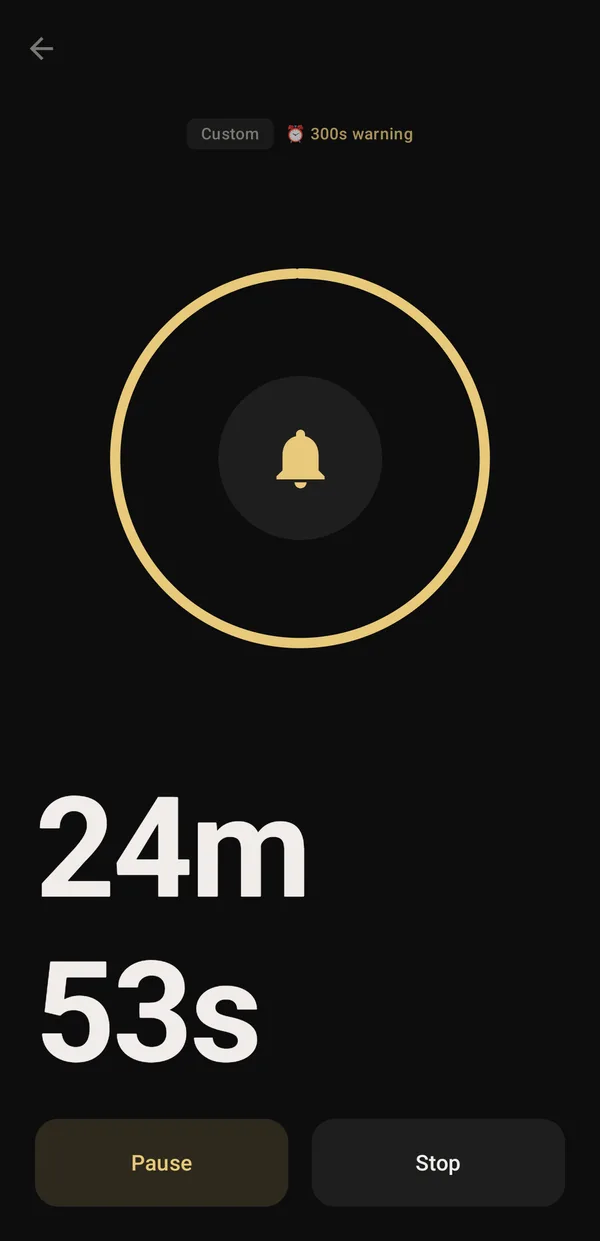
Ting running a 25-minute timer with a five-minute warning, and Pause and Stop buttons

Two problems, one app.

For the people using it

Most timers buzz until you find your phone.

I wanted what an audition panel has: one ting of a desk bell, and everyone knows time is up. Plus small heads-ups, like five minutes before the end, or a ting every five minutes until twenty. Nothing did just that, so I built it, thinking other people would want it too.
Why it's hard

Android works hard to keep apps quiet.

Battery saving delays timers, silent mode and Do Not Disturb mute them, and a sound that starts after the buzz feels broken. A timer has to fire on the second, be heard when it should be, and keep going when the app is closed or the phone restarts.

What was at stake.

  1. On time, every time

    Android's battery saving can push ordinary alarms back by minutes.

  2. Heard, not missed

    Silent mode, low volume and Do Not Disturb all stand between a timer and your ears.

  3. Ting and buzz together

    Loading a sound takes longer than starting a vibration, and the gap is easy to notice.

  4. It can't just vanish

    Swiping the app away or restarting the phone mustn't lose a running timer.

If you only read one part, read this.

1 ting and time is up

A desk-bell sound instead of a ringing that won't stop. With a heads-up set, the end rings twice so you can tell them apart.

On time even with battery saving on

Scheduled with Android's alarm-clock API, which battery saving doesn't delay.

1 tap to start a timer

Quick-start buttons, presets, a home-screen widget and a shortcut to your last timer.

Live on Google Play

Shipped solo, with its first downloads and reviews.

From a tap to a ting.

  1. First run

    A tour, then out of the way.

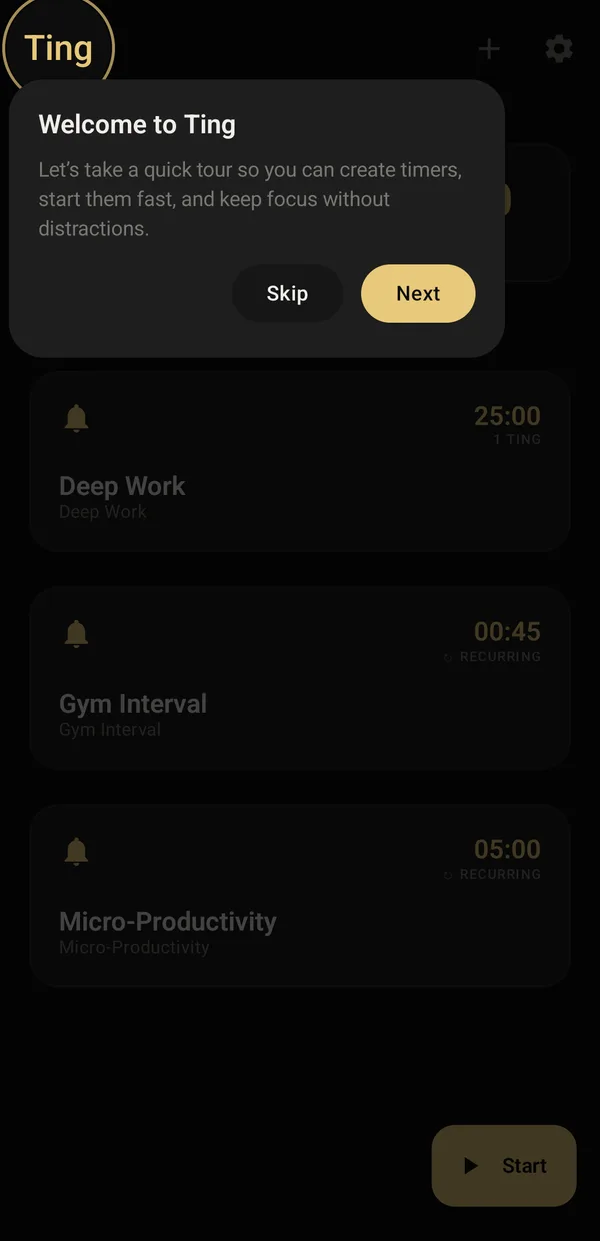
    Welcome to Ting tour card with Skip and Next over the presets

    A short first-run tour that points at each control.

    The first launch walks through creating timers and starting them fast, and can be skipped in one tap.

    • Jetpack Compose
    • DataStore
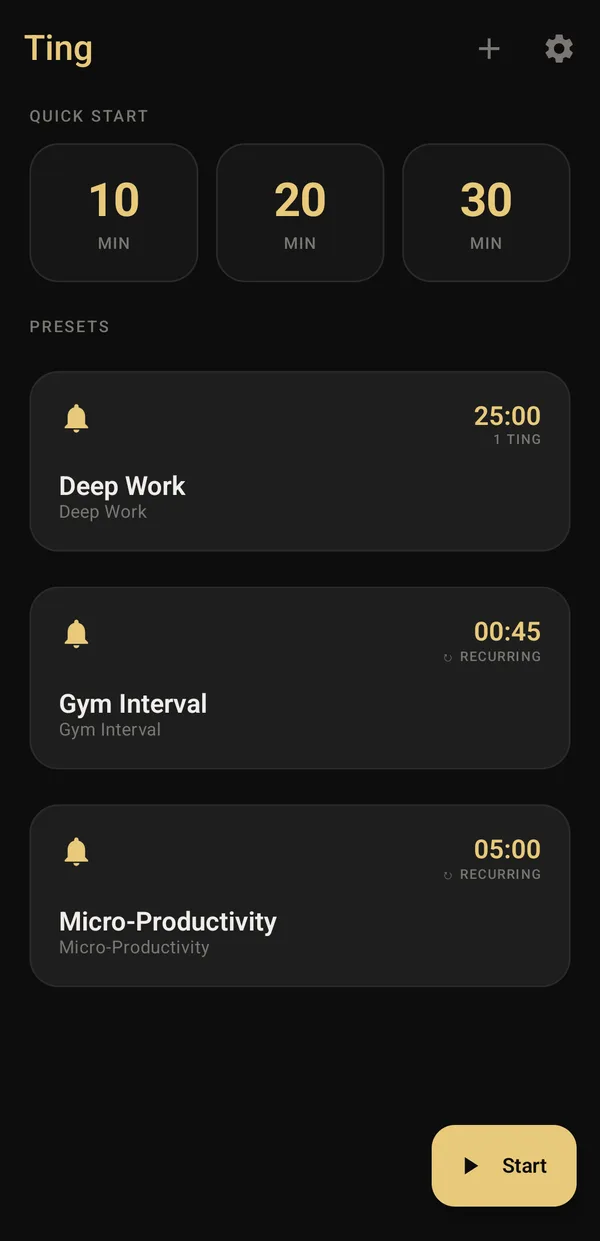
  2. Start

    One tap for 10, 20 or 30 minutes.

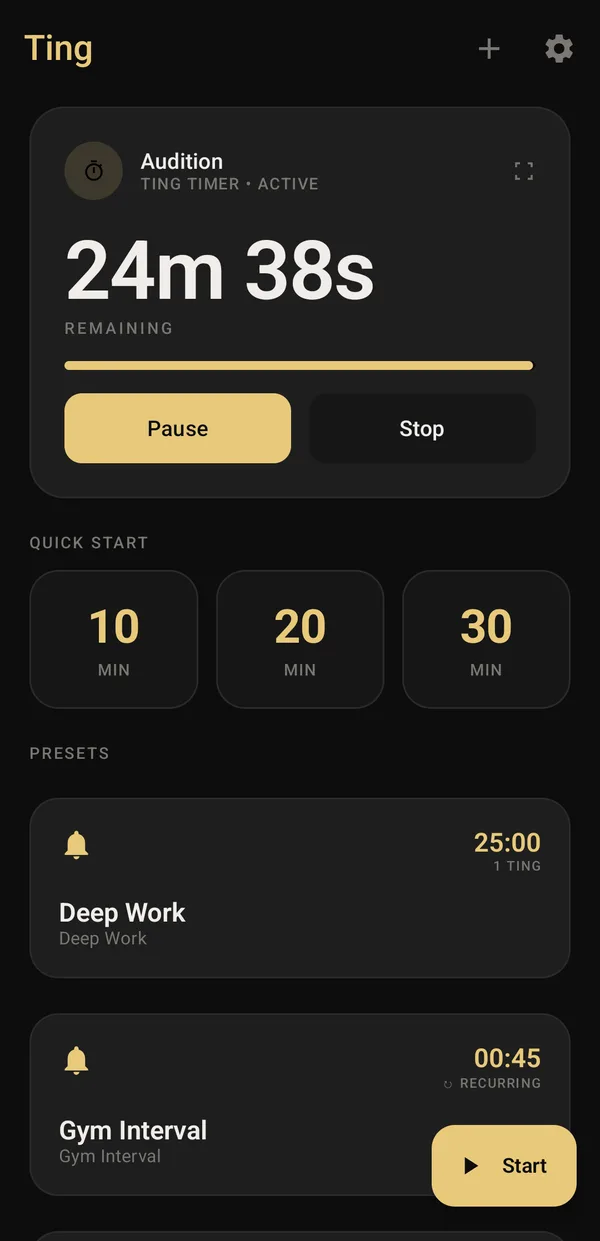
    Ting home with 10, 20 and 30 minute quick starts and Deep Work, Gym Interval and Micro-Productivity presets

    Quick start, presets, a widget and a last-timer shortcut.

    Quick-start buttons sit on top, with presets for deep work, gym intervals and short bursts underneath. Your last timer also shows up as an app shortcut.

    • Material 3
    • Room
    • App shortcuts
  3. Make one

    Choose how it warns you.

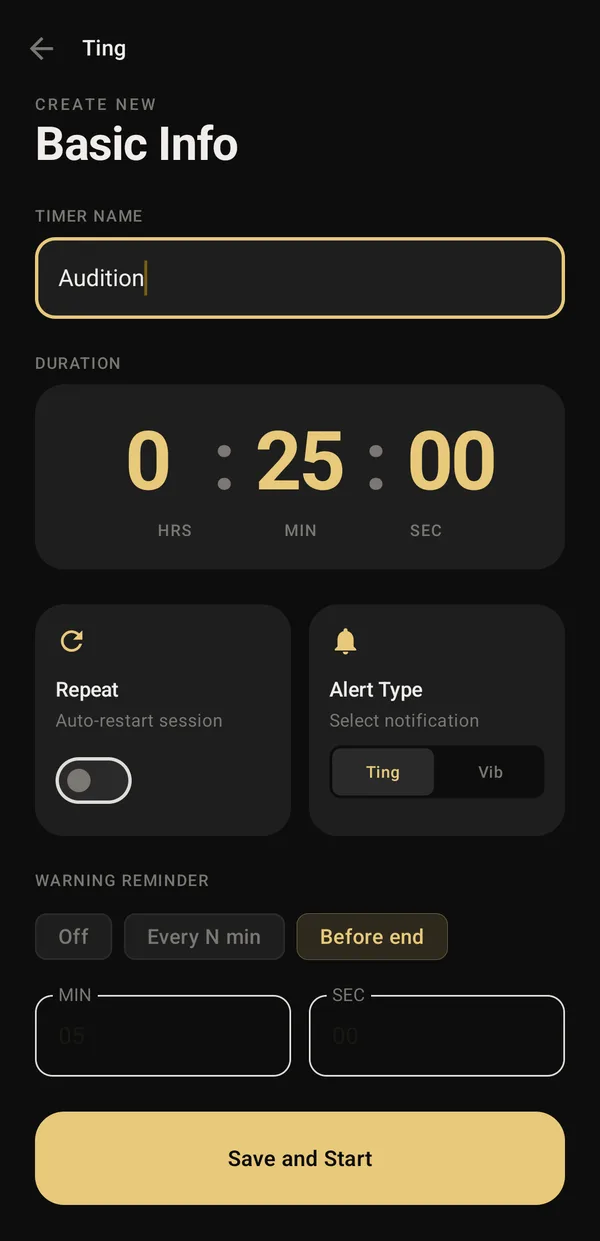
    Create timer screen named Audition, 25 minutes, with a Before end warning reminder

    Every N minutes, or N minutes before the end.

    Set the length, repeat it automatically, pick a ting, vibration or silence, and add a heads-up: every few minutes, or a few minutes before the end.

    • Wheel picker
    • Room
  4. Running

    A heads-up, then time's up.

    Running timer at 24 minutes 53 seconds with a 300 second warning badge

    The warning is one ting; the end is two.

    The timer counts down on an exact alarm and warns with one ting five minutes out. The end rings twice, with the buzz at the same moment, so you can tell the two apart.

    • Alarm clock API
    • Foreground service
  5. Keep going

    Leave it, it keeps time.

    Ting home with the Audition timer active on top, 24 minutes 38 seconds remaining

    Restored by WorkManager after a restart.

    Go back home and the running timer sits on top with Pause and Stop. Close the app or restart the phone and it carries on.

    • WorkManager
    • Glance widget

One app, taken apart.

Layer 1

What you tap

Jetpack Compose and Material 3, dark first with a warm gold accent, plus a home-screen widget built with Glance.

  • Jetpack Compose
  • Material 3
  • Glance

Layer 2

What keeps time

A foreground service runs the timer, while Room and DataStore remember timers, sessions and settings, wired with Hilt.

  • Foreground service
  • Room
  • DataStore
  • Hilt
  • Flow

Layer 3

What Android gives

The alarm-clock API, WorkManager for restarts, the alarm audio stream, notification channels, and Play's in-app updates.

  • AlarmManager
  • WorkManager
  • Alarm audio
  • In-app updates

One timer, start to finish.

  1. Started: Quick start, a preset or the widget
  2. Scheduled: An exact alarm clock is set
  3. Running: A foreground service keeps it alive
  4. Heads-up: One ting, five minutes before the end
  5. Time's up: Two tings and a buzz, together
  6. Next round: Repeating timers restart on their own

Phone restarted halfway? The timer is restored when it boots.

YouTingAndroid

Calls I made, and why.

The alarm-clock API, not a plain alarm.

It's the kind of alarm battery saving doesn't delay, and it copes with the app being killed far better than an ordinary exact alarm.

Not delayed by battery saving

Loud when it should be.

The ting plays on the alarm stream, on a high-priority channel that can get past Do Not Disturb after a one-time permission. If the bundled sound fails, the system alarm tone steps in.

Sound and buzz in the same moment.

The ting is loaded before it's needed, so it starts with the vibration instead of trailing behind it.

Back after a restart.

Each timer stores when it started, and WorkManager restores running timers after the phone boots, so a running timer comes back after a restart.

Where it stands.

Ting is live on Google Play with its first downloads and reviews. Crash reporting and in-app updates are built in. The screens here are from a test build on an emulator.

on Google Play
Live
downloads so far
10+
ways to start a timer
4
alerts: ting, vibration or silent
3

What I'd build for you.

If your app has to act on time

Alarms, reminders and background work that Android won't quietly delay or kill.

If you need a small app shipped

From the idea to a live Google Play listing, with updates and crash reporting from day one.

If you're hiring for Android

Compose, Glance widgets, foreground services, WorkManager and exact alarms.

If the details matter

The sound, the timing of a vibration and the first-run tour get the same care as the code.

Built with.

  • Kotlin
  • Jetpack Compose
  • Material 3
  • Glance
  • Hilt
  • Room
  • DataStore
  • WorkManager
  • AlarmManager
  • Firebase Analytics
  • Crashlytics
  • Play In-App Updates
See the whole stack
Next projectCloth LabLaundry pickup for Jaipur, on Android, iPhone and the web. I designed it with the founder and I'm building every part of it.