Skip to content
Portfolio project

GeoFence

A group shares a fenced area, and the moment anyone leaves it, everyone else is told, without GPS drift crying wolf.

Role
Solo developer
Platform
Android, shared Kotlin core
Stack
Kotlin Multiplatform, Compose
Built
August 2026
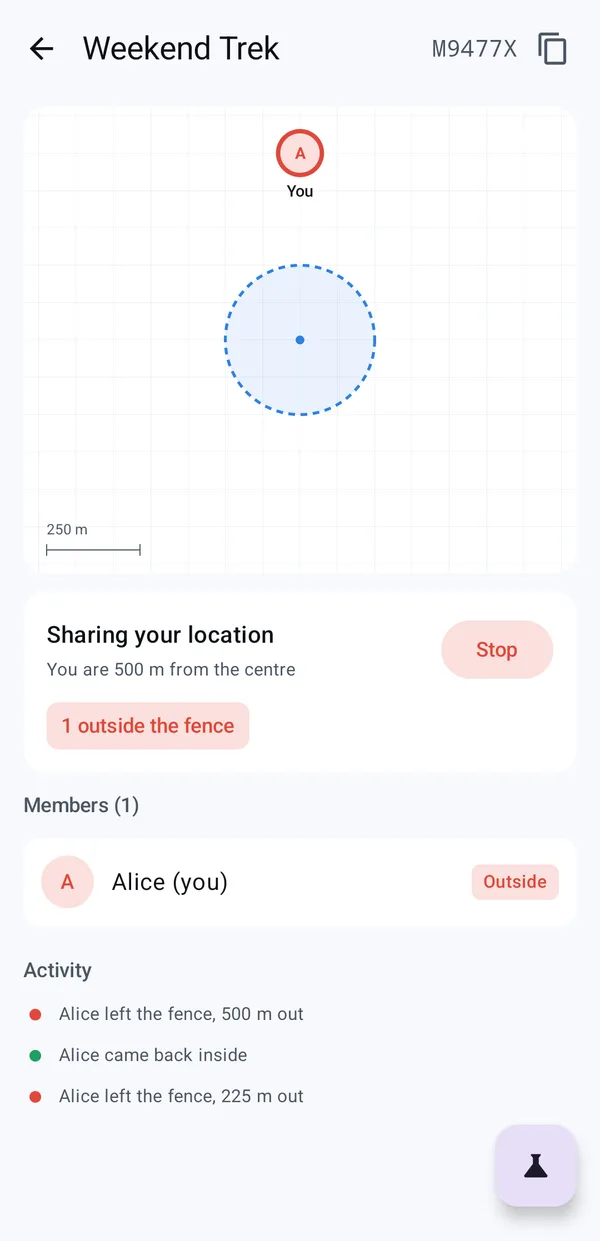
Weekend Trek group: Alice is outside the fence, shown in red, with the activity feed below

Two problems, one app.

For the people using it

Groups need to know when someone wanders off.

On a trek, at a festival or on a work site, someone drifts away and nobody notices until it matters. I kept seeing companies and families wanting a simple way to know when someone has left an area. GeoFence does that: create a fence, share a code, and the whole group is told when anyone steps outside.

Why I built it

GPS drifts, and naive fences cry wolf.

I wanted to try OpenStreetMap and the free alternatives to Google Maps, and to solve the part that's actually hard. Checking whether someone crossed a circle is one line of maths. Deciding they really did is the whole problem: near the edge, GPS wanders tens of metres either way, and a naive check tells your friends you left and came back nine times while you queued for coffee.
What was at stake.

  1. False alarms get muted

    An app that cries wolf trains people to ignore it, and then the real alert is missed too.

  2. Signal drops where it matters

    Treks, festivals and car parks are exactly where the network is weakest.

  3. No budget for maps or servers

    No Maps API key and no paid Firebase plan, so the maps and the logic had to be free.

  4. Anyone can run it

    Clone it and it builds against a demo project, with nothing to sign up for.

If you only read one part, read this.

25 m dead band either side of the fence

GPS drift inside the band can't flip anyone from inside to outside. That's the demo setting; a release build uses 30 m.

5 s outside before it counts

A step out and back, or a fix that jumps and returns, never reaches the group. A release build waits 30 s.

50 m accuracy gate

A fix less accurate than this proves nothing, so it's dropped, not guessed at.

19 tests, in milliseconds

The engine is a pure function of its inputs, so a whole walk replays in a unit test.

From a fence to an alert.

  1. Join

    No account, just a name.

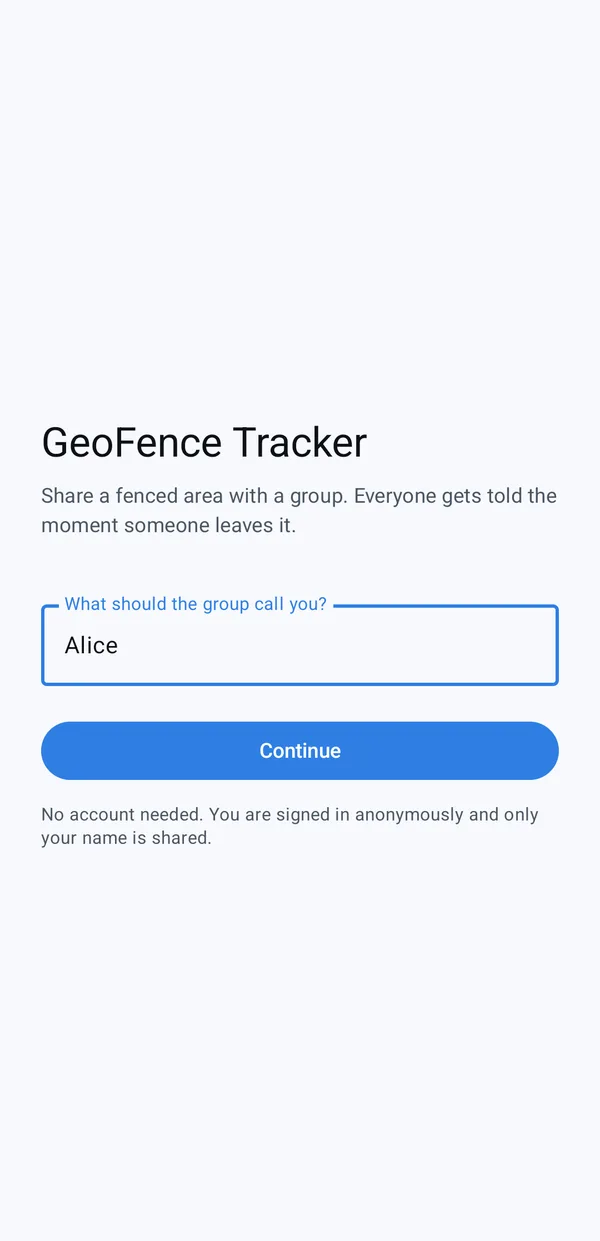
    GeoFence Tracker sign-in asking what the group should call you

    Anonymous Firebase sign-in: nothing to remember.

    Type the name the group will see and you're in. Sign-in is anonymous, and only your name is shared.

    • Firebase Auth
  2. Place a fence

    Pick a centre and a radius.

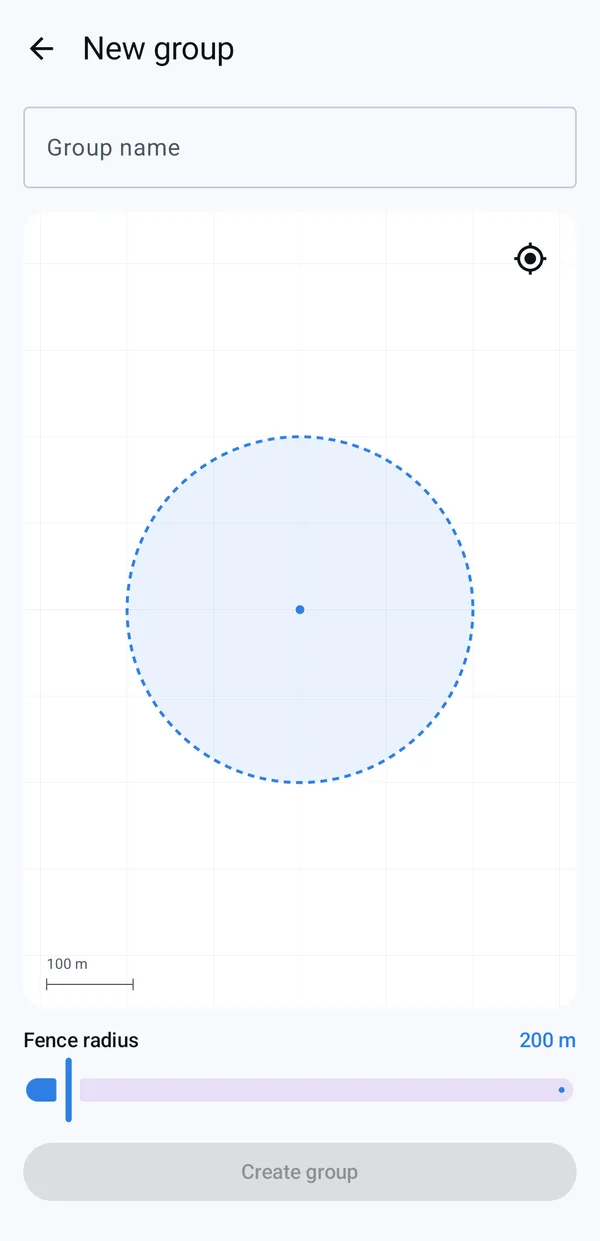
    New group screen with a fence on the map and a radius slider at 200 m

    The fence is drawn to scale, so it stays true as you zoom.

    Name the group, place the fence and slide the radius. If location permission is denied, the screen falls back to a default centre instead of a dead end.

    • Compose
    • Material 3
    • Play services location
  3. Share the code

    A code you can read out loud.

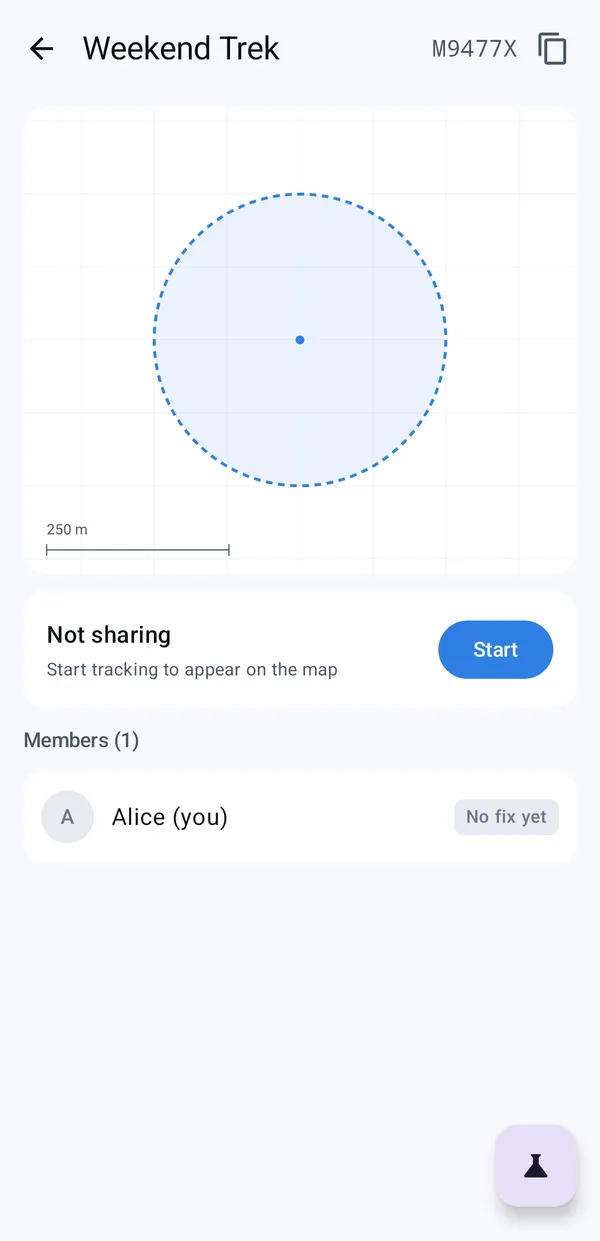
    Weekend Trek group with the join code M9477X, the fence and a Start sharing button

    0/O and 1/I are left out, because people read codes aloud.

    Each group gets a six-character join code. Start sharing and you appear on everyone's map with your distance from the centre.

    • Firestore
    • Foreground service
  4. Someone left

    Out means really out.

    Alice shown outside the fence in red, 500 m from the centre

    Past the band, for long enough, with an accurate fix: 25 m and 5 s in the demo, 30 m and 30 s in release.

    Alice walks past the band and stays out. Only then does her dot turn red on every phone and the crossing land in the activity feed, with how far out she is.

    • GeofenceEvaluator
    • Firestore
  5. The alert

    Everyone else is told.

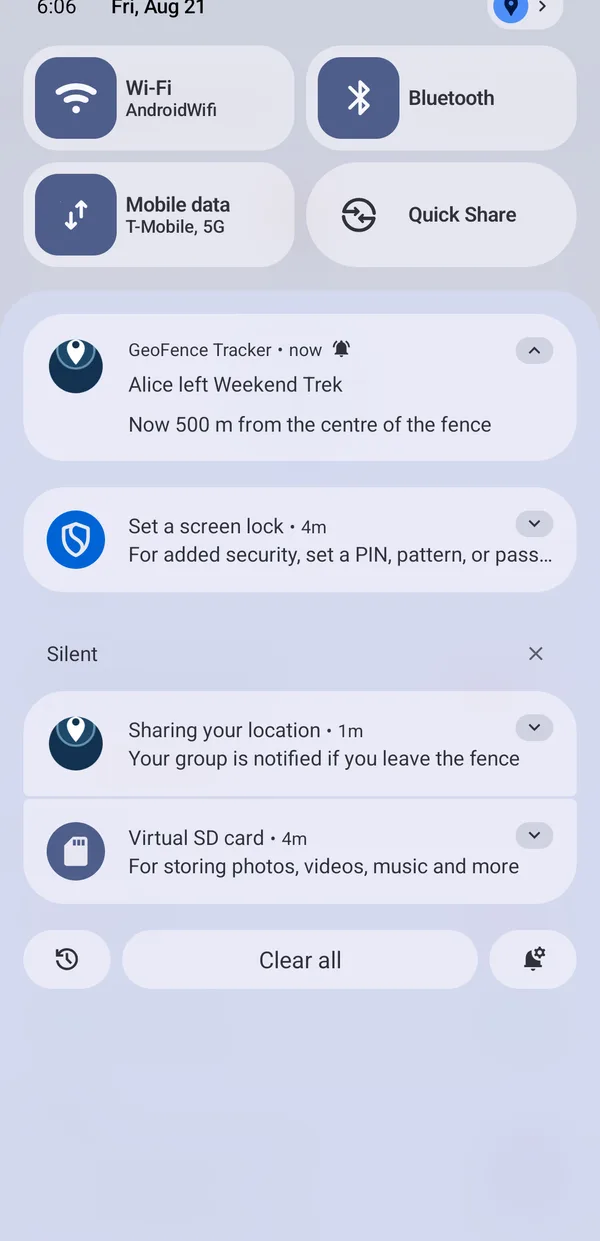
    Notification on a second phone: Alice left Weekend Trek, now 500 m from the centre of the fence

    One alert per real crossing, never a storm.

    Once the crossing is confirmed, the other phones raise a notification. You're never told about yourself, and opening a group doesn't replay its old history as a burst of alerts.

    • Notifications
    • Firestore listeners

One app, taken apart.

Layer 1

What you tap

Jetpack Compose and Material 3 screens, and a real vector map with no API key. The screens on this page show the earlier, simpler map.

  • Jetpack Compose
  • Material 3
  • MapLibre
  • OpenFreeMap

Layer 2

What's shared

The geofence engine, the domain and the whole presentation layer live in shared Kotlin with no Android types, wired with Koin.

  • GeofenceEvaluator
  • Haversine
  • MVI
  • Koin
  • Flow

Layer 3

What it talks to

Firebase for sign-in, live positions and crossings, and Play services for location. Alerts travel over live Firestore listeners.

  • Firebase Auth
  • Firestore
  • Location

Walk out without leaving your chair.

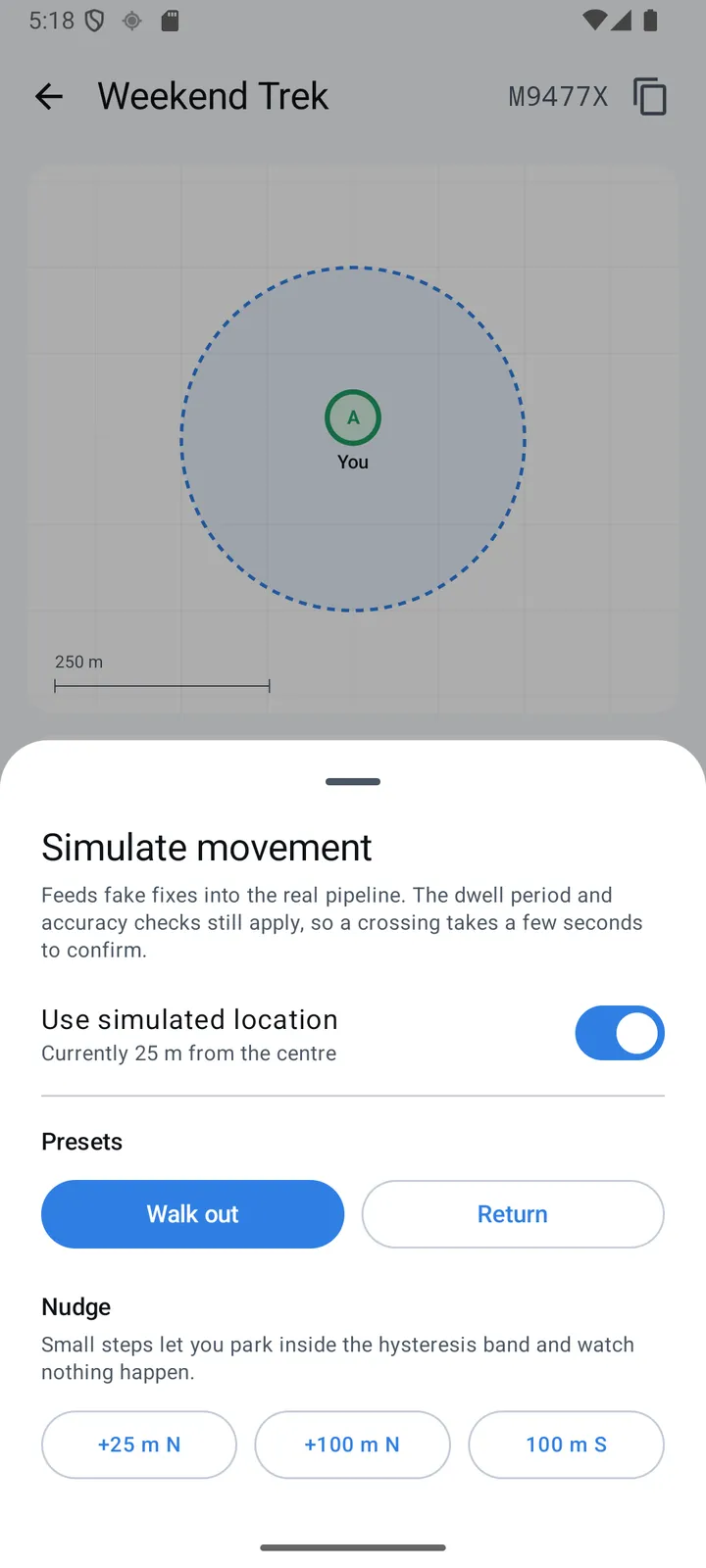
Simulate movement sheet with Walk out and Return presets and +25 m nudges

A built-in simulator feeds made-up positions into the same pipeline as real GPS, so anyone can watch a crossing happen, and watch drift do nothing, from a desk.

  • Walk out and Return presets for the whole journey
  • Small nudges park you inside the band, where nothing should happen
  • The same dwell and accuracy rules apply to simulated positions
  • It moves the input, not the result, so the demo can't cheat

One crossing, start to finish.

  1. Position arrives: With its accuracy and time
  2. Accuracy gate: Worse than 50 m is dropped
  3. Past the band: 25 m beyond the fence
  4. Dwell: Still outside after 5 seconds
  5. Crossing confirmed: Written once to Firestore
  6. Everyone told: A notification on every other phone

Drift inside the band, or a step back before the wait is over, ends the journey early: nobody is told. Demo settings shown; a release build uses 30 m and 30 s.

Member's phoneThe engineThe group

Calls I made, and why.

The engine runs on the phone.

A server could check every position, but losing signal is the normal case on a trek or at a festival. On the device, a crossing is still detected offline, queued and synced later, and each check is one cheap distance calculation.

Works with no signal

Not Play services geofencing.

Android's built-in geofencing hides its debounce rules, can't be driven by a simulator and leaves nothing to test. Doing it in shared Kotlin makes every rule explicit, tuned and tested.

Real maps, no key, no bill.

MapLibre with OpenFreeMap vector tiles in light and dark. The fence is drawn as a geodesic shape, not a pixel circle, so it keeps its true size at every zoom.

Edge cases are handled on purpose.

Joining while already outside never alerts. Your own writes don't echo back as news. A wrong device clock can't hide a real crossing. A broken document is skipped instead of taking the listener down.

17 edge cases written down

Where it stands.

A working portfolio project: two phones on real Firebase, a fence, and alerts that only fire for real crossings. The screens here are from an earlier version of the design.

tests, milliseconds to run
19
lines of code in the geofence engine
<100
edge cases handled on purpose
17
API keys or billing to run it
0

What I'd build for you.

If your app depends on location

Geofences, tracking and alerts that people trust because they don't cry wolf.

If costs matter

Real maps with no API key or billing, and logic that runs on the phone instead of a server.

If you're hiring for Kotlin Multiplatform

Shared domain and presentation, with platform code only where it has to be.

If your code will be reviewed

Tests that read like the spec, with the trade-offs and the limits written down.

What's next.

  • Deploy the push-alert Cloud Function, already written, so alerts arrive with the app closed
  • Ask for background location properly
  • An iPhone app on the shared Kotlin core
  • Editable fences

Built with.

  • Kotlin Multiplatform
  • Jetpack Compose
  • Material 3
  • Koin
  • Coroutines and Flow
  • Firebase Auth
  • Firestore
  • Play services location
  • MapLibre
  • OpenFreeMap
See the whole stack
Next projectTingAn interval timer that ends with one desk-bell ting instead of an alarm that won't stop, and still fires on time with the phone locked.